Support Center
Find guides, answers, and help to make the most of IN8NESS
Why Use the Ticket System?
- Track your inquiry from submission to resolution
- Add follow-up questions and continue the conversation
- View complete history of all your past support requests
- Get automatic email notifications when we respond
- Rate your support experience to help us improve
Individual Assessment Guides
Getting Started with Assessments
Research Study Guides
For Study Coordinators
Learn how to create studies, invite participants, and analyze results.
For Study Participants
Instructions for completing assessments as part of a research study.
Frequently Asked Questions
Q What is in8ness.com?
A In8ness.com is an online personality assessment and reporting service based on the International Personality Item Pool (IPIP) and the Big Five personality model.
Q Who may benefit from the services offered at in8ness.com?
A Anyone 13 years or older who is interested in learning more about personality in general, the personality of others, or their own personality. This includes individuals seeking self-knowledge, researchers conducting studies, and educators teaching about personality psychology.
Q Are assessments and reporting services provided on this site the same as a professional personality diagnostic tool?
A No. The assessments provided on this site are not the same as a professional personality diagnostic tool and the results should not be used for any purpose related to developmental or medical diagnoses or related purposes. Professional diagnostic tools include additional services such as use of multiple assessments with review and interpretation of the results by a trained professional. The services provided by In8ness.com are intended for educational and informational purposes only.
Q Are the personality surveys used by In8ness.com under copyright protection?
A No. The IPIP is an open source resource, available for public use. Refer to the International Personality Item Pool (IPIP) website for more details.
Q Are products offered in multiple languages, other than English?
A Yes, In8ness assessments and reports are available in other languages, including Chinese, French, German, Japanese, and Spanish.
Q Are the assessments on In8ness.com free?
A No. The assessments are not free, but every new user is provided one complimentary 20-item assessment. Additional tests can be purchased from our product purchase page.
Q What is a study coordinator?
A A study coordinator is a user who creates and manages personality assessment studies on IN8NESS. Coordinators can purchase assessment credits, invite participants via email, and analyze aggregated results through our research dashboard.
Q How do I become a study coordinator?
A Any registered user can become a study coordinator by purchasing a study package. Visit the pricing page to view available study packages and get started.
Q What's the difference between individual assessments and study assessments?
A Individual assessments are purchased and completed by a single user for personal insight. Study assessments are purchased in bulk by a study coordinator and distributed to multiple participants, with results analyzed in aggregate for research purposes.
Q How do I invite participants to my study?
A Once you create a study, you can add participant email addresses through the study dashboard. Participants will receive an email invitation with a unique link to complete the assessment. For detailed instructions, see the Study Coordinator User Guide.
Q Can study participants see other participants' results?
A No. Individual participant results are only visible to the study coordinator. Participants can only view their own assessment results. The coordinator sees aggregated data and analytics across all participants.
Q Do study assessment credits expire?
A No. Once you purchase assessment credits for your study, they remain available in your coordinator pool until used. Studies themselves remain active until you close them.
Q Where can I order additional surveys for my account?
A Additional surveys can be purchased online.
Q When a survey is ordered, how will I access it?
A Within minutes of placing a successful order, you will receive a receipt via e-mail and the tests will be listed as "Available" on your In8ness.com Assessments page. The applicable Assessments summary space on the page will reflect the purchased tests as "Purchased" and "Available". For example, see the below image.
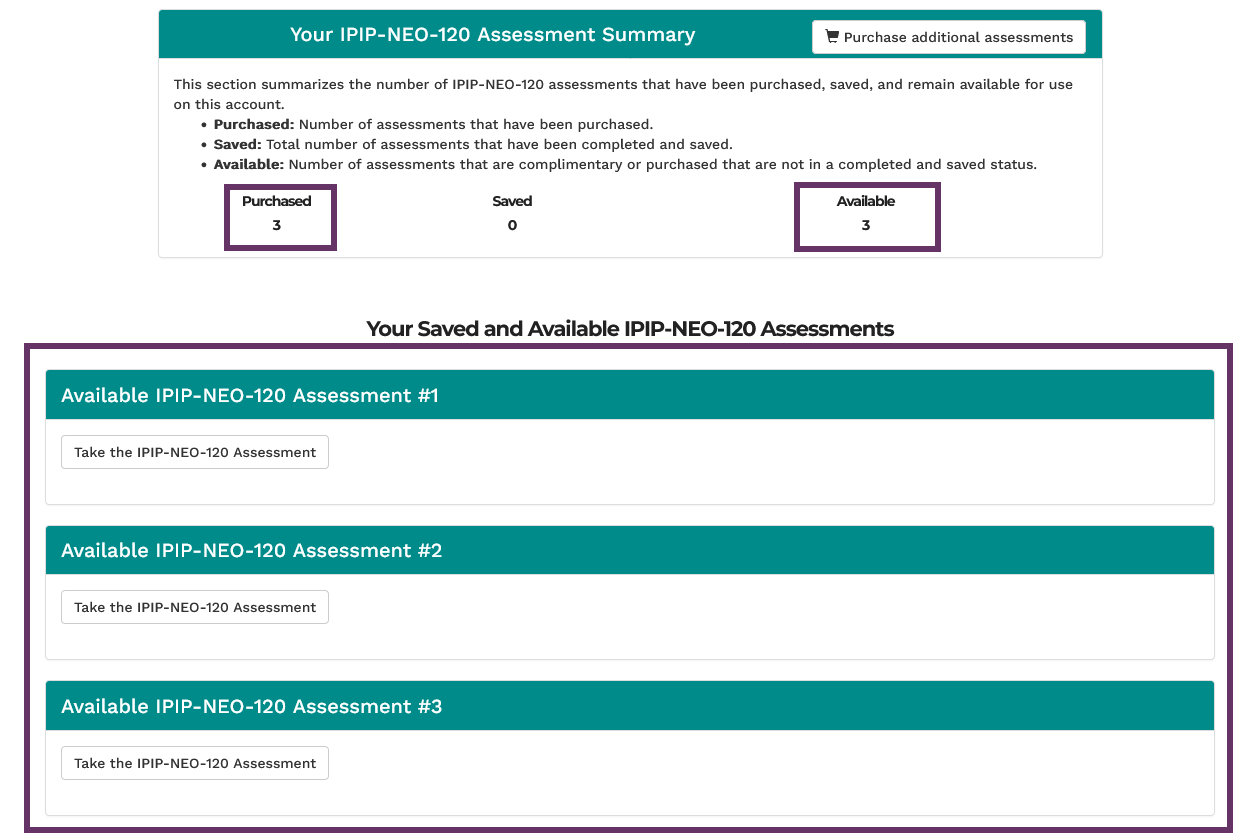
Example of resulting "Assessments" screen after a user purchases 3 IPIP-NEO-120 assessments.
Q Is ordering secure?
A In8ness.com uses the Stripe platform to process payments which is one of the safest payment processors available. Any financial information submitted into the Stripe ordering form is encrypted and secure.
Q What is the return policy?
A If you are not satisfied with any digital content that you have purchased, we offer a full refund within 30 days of purchase. Simply submit a message with the issue type of 'Billing / Order Assistance' selected and subject 'REFUND' and include the order number information in the details.
Q What information is collected from me?
A Basic technical information such as IP address and browser information is collected from all users visiting the site. Users that sign up to complete the assessment are required to provide basic account information such as a username, e-mail, and password. Upon completing any assessment services, the user is providing responses to a questionnaire that are stored in a testing database. If additional assessments are purchased then basic order reference data is also collected; however, all sensitive payment details are processed securely and separately with our payment provider. For more information, please refer to our privacy policy.
Q Is this website secure?
A The Site has standard security measures in place and leverages the secure https protocol for delivering information to and from its Users. Site information is stored in secured databases. Financial transactions are processed securely and separately through our payment provider. To maximize security, it is strongly recommended that Users not share their Site username and password credentials with others.
Q Is there any risk that assessment information submitted to the Site is disclosed to others?
A Individual assessment information submitted on the Site is stored in a secure database, assumed to not contain personally sensitive data, and not sold or communicated to any third parties. However, data breaches are always a risk. If the Site learns that its User's assessment data has been breached, it will notify those impacted Users. To avoid any unintended disclosure of User or Subject assessment information, we advise Users not to submit any personally identifiable information on the Site's assessment services. Specifically, when defining who the Subject is for a given assessment, we recommend not using any real names or other identifying information. Instead, it is advised to use a pseudonym or other non-identifiable individual placeholder.
Q How is participant data protected in research studies?
A Study participant data follows the same security protocols as individual assessments. Study coordinators can only view aggregated results and cannot access individual participant responses unless the participant explicitly shares their results. We recommend coordinators inform participants about data usage as part of their research consent process.
Q What internet browser should I use in order to use the services on the site?
A Generally, any modern web browser with JavaScript enabled will be able to use the site's services. We recommend using the latest versions of Chrome, Firefox, Safari, or Edge for the best experience.
Q Am I able to save progress on an assessment once it is started and return later to complete it?
A No. The assessments are designed to be completed in a single session. Once an assessment is started, there is no opportunity to save progress before submitting. If you leave the assessment page while it is incomplete or click refresh while it is in progress then all responses will be removed and you will need to restart the assessment (and the items will be randomly reordered).
Q When I click 'Submit' on an assessment, nothing happens. What should I do?
A The assessment cannot be submitted if any of the items does not have a response. Review the responses and complete any missing items. Additionally, once 'Submit' is clicked, depending on network conditions and system usage at the time, it may take additional time to run the calculations and generate the report.
Q Am I able to retake a completed assessment?
A Yes, but in order to do so you will have to delete the existing item responses for the assessment. Refer to the following guide.
Q Can I download or print my assessment results?
A Yes. Your assessment results are available as downloadable PDF reports that you can save or print for your records.
Q If I have a technical issue with the assessments or report tools that is not addressed above, how can I submit a question or request support?
A Submit a new message on our contact us page with the about tag of "Assessments / Reports". The In8ness.com team will do its best to support and help resolve the issue.
Need Additional Help?
Can't find what you're looking for in our guides or FAQs?
Submit a Support TicketOr email us directly at support@in8ness.com ((Note: Using the ticket system helps us track and respond to your inquiry more efficiently))